How to Write Emails in English for Professional Success

Writing a professional email in English isn't just about grammar; it's about structure. Think of it as a simple, four-part recipe: a sharp subject line, a direct opening, a clear body, and a courteous closing. Once you nail this approach, you'll find your messages get opened, understood, and—most importantly—acted upon.
The Building Blocks of a Professional English Email
Before you even start typing, it helps to know what separates a great email from one that gets instantly archived. Every professional message, no matter the topic, relies on the same core components. Getting these right gives you a solid foundation for every email you send.
Email is still the king of workplace communication. In fact, a whopping 36% of employees call it their number one tool for talking to colleagues, easily beating out chat apps and project management software. With the average office worker juggling around 110 messages a day, writing with clarity isn't just a nice-to-have skill—it's your ticket to getting noticed in a crowded inbox.
To help you get started, here's a quick breakdown of what makes a great email.
Anatomy of an Effective Email
This table summarizes the key parts of a professional email and why each one matters.
| Email Component | Purpose | Quick Tip |
|---|---|---|
| Subject Line | To grab attention and state the email's purpose immediately. | Be specific and concise. "Meeting Update" is vague; "Marketing Sync Rescheduled to 3 PM Thursday" is perfect. |
| Opening | To get straight to the point and respect the reader's time. | State your reason for writing in the first sentence. No long, fluffy intros needed. |
| Body | To provide details in an easy-to-read format. | Use short paragraphs, bullet points, and bold text to make your message scannable. |
| Closing | To politely end the email and clarify the next steps. | Include a clear call to action, like "Please share your feedback by Friday." |
Each part plays a role in making your message effective and easy for the recipient to process.
H3 The Subject Line Your First Impression
Let's be honest: the subject line is everything. It's the gatekeeper that decides if your email gets opened or ignored. A weak, vague subject line is a one-way ticket to the trash folder. A strong one is specific, concise, and tells the reader exactly what's inside.
Think of it as the headline for your message. It needs to instantly answer the question, "Why should I care about this?"
- Vague: "Meeting"
- Specific: "Marketing Sync Meeting Moved to 3 PM on Thursday"
- Vague: "Question about your report"
- Specific: "Quick Question Regarding Q3 Sales Report Data"
See the difference? Specificity wins every time.
H3 The Opening Get Straight to the Point
Once they've opened your email, your first sentence needs to deliver. Don't waste time with long, rambling introductions. People in a professional setting are busy, and they'll appreciate you getting right down to business.
A solid opening respects their time by immediately stating your purpose. This is a big help for non-native speakers, too, as it cuts out any confusion and sets a clear tone from the get-go. For a deeper dive into the fundamentals, this guide on how to write a professional email is a fantastic resource.
H3 The Body Structure Your Message for Clarity
The body is where you lay out the details, but the key here is readability. Nobody wants to face a giant wall of text. Break your message into short paragraphs, use bullet points for lists, and bold key phrases to draw the eye to important information.
A well-structured email body guides the reader through your message effortlessly. Each paragraph should focus on a single idea, making your points easy to digest and remember.
This approach makes your email scannable, letting the recipient grasp the main points even if they're just skimming. If you're ever stuck on phrasing or want to make your sentences flow more naturally, a rewriting tool like Word Spinner can be a huge help. Its leading rewriting capabilities can polish your text, humanize your content for a natural tone, and ensure your message is completely plagiarism-free.
H3 The Closing Define the Next Step
Finally, a strong closing accomplishes two things: it wraps up the conversation politely and makes the next steps crystal clear. Whether you're waiting for a reply, scheduling a follow-up, or just passing along information, your closing should leave no room for doubt about what happens next.
A simple "Thank you" or "Best regards" is fine, but a clear call to action is even better. For example, "Please let me know your availability for a brief call next week" is far more effective than a generic sign-off. As you keep honing your communication, check out our guide to improve your English writing skills for more practical tips.
Matching Your Tone to Your Audience
The words you choose in an email can completely change how your message lands. Sending a super casual message to a new client or a stiff, formal email to a close teammate can create awkwardness and kill your credibility. Nailing the right tone isn't just about being polite; it’s about making sure your message actually works.
Knowing how to write emails in English means understanding that your relationship with the recipient dictates your language. Are you writing to your boss, a long-time colleague, or someone you’ve never met? Each situation calls for a different approach, and this choice between formal and informal language is one of the most important you'll make before you hit "send."
The Great Divide: Formal vs. Informal
Think of email tone as a spectrum. On one end, you have formal writing—perfect for that first contact with a new client, a job application, or an email to senior management. On the other end is the informal style you’d use for daily chats with teammates you know well.
The differences pop up in everything from your greeting to your sign-off.
- Greetings: "Dear Mr. Smith" is strictly formal. "Hi John" is friendly and informal.
- Phrasing: "I am writing to inquire about…" is the formal way to ask. Its informal cousin is "Just wondering about…"
- Sign-offs: "Sincerely" or "Best regards" are safe, formal choices. "Cheers" or a simple "Thanks" are much more relaxed.
Getting this right shows respect and social awareness, which makes your recipient much more likely to engage with what you have to say.
When to Use Which Tone
Deciding which tone to adopt can feel tricky, but a few simple guidelines can clear things up.
Go Formal When You Are:
- Contacting someone for the first time.
- Writing to a client or an external partner.
- Communicating with senior leadership or someone in a higher position.
- Handling a serious or sensitive topic, like a complaint or an official request.
You Can Be Informal When You Are:
- Emailing a colleague you work with daily.
- Following up on a previous, casual conversation.
- Sending quick updates or non-urgent info to your immediate team.
Here's a pro tip: it's always safer to start more formally and then adjust your tone based on their reply. If they sign off with their first name and use a relaxed style, feel free to mirror that in your next email.
With a mind-boggling 376 billion emails expected to be exchanged globally every day by 2025, getting the tone right has never been more critical. Miscommunication from the wrong phrasing is a huge problem, costing businesses billions and even reducing response rates by up to 30% when emails seem unprofessional.
Choosing the right tone is a foundational skill. For more advice on this, our collection of business writing tips can provide some extra guidance.
This decision tree helps visualize whether your email's purpose calls for a direct, informative style or a more collaborative, questioning one.
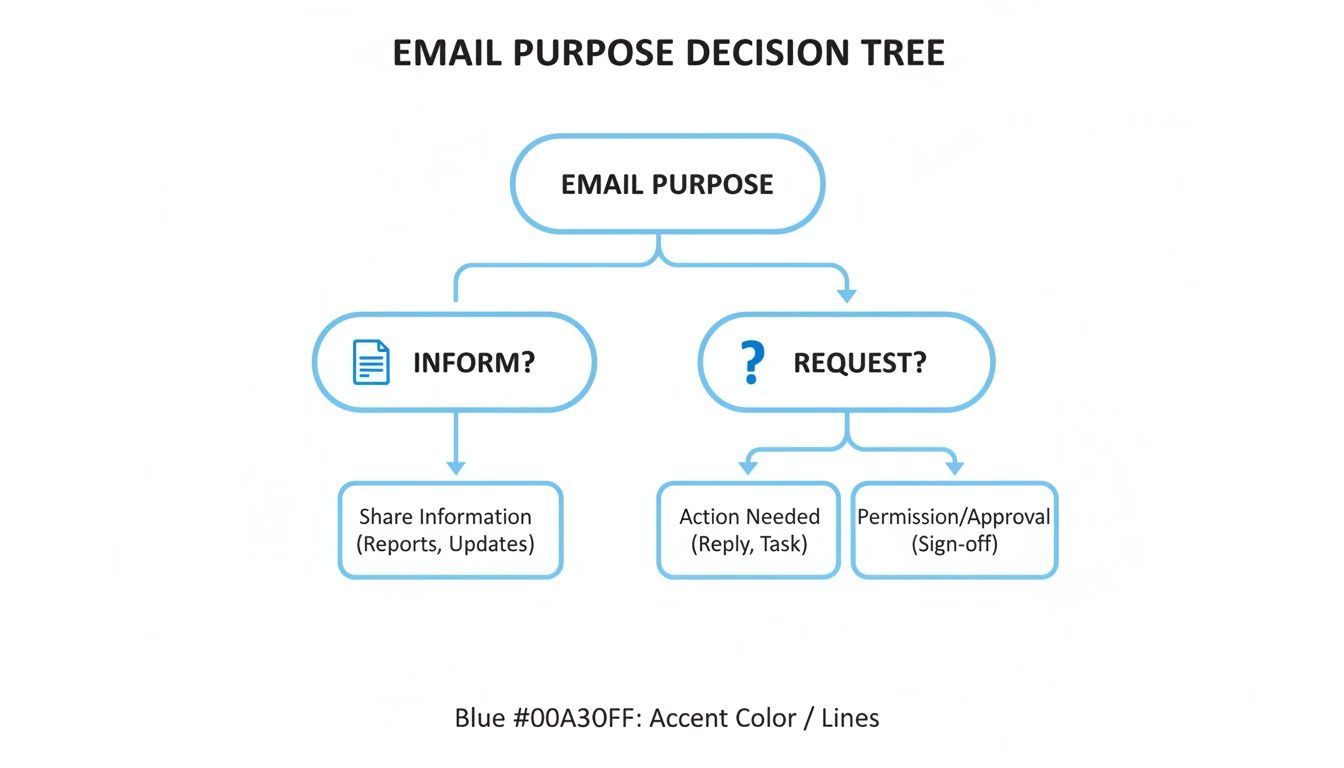
Once you know if you're informing or requesting, you can pick the language that will get the job done.
Practical Examples Side-by-Side
Seeing the difference in action is often the best way to learn. Here’s a quick comparison of how you might phrase the same requests in formal versus informal emails.
Formal vs. Informal Email Language
| Situation | Formal Phrasing | Informal Phrasing |
|---|---|---|
| Requesting a file | Could you please provide me with the Q3 sales report at your earliest convenience? | Can you send over the Q3 sales report when you get a chance? |
| Arranging a meeting | I would like to schedule a meeting to discuss the project timeline. Please let me know what time works best for you. | Let's catch up about the project timeline. Are you free sometime this week? |
| Apologizing for a delay | Please accept my apologies for the delay in responding. I will provide an update by the end of the day. | Sorry for the late reply. I'll get back to you with an update by EOD. |
Notice how the formal examples use more complete sentences and polite, traditional phrases. The informal ones are more direct, use contractions, and have a conversational feel—which is perfectly fine when the relationship allows for it.
Helpful English Phrases for Common Work Emails
Knowing the right thing to say can make all the difference between a clunky email and a smooth, professional one. When you're learning how to write emails in English, having a few go-to phrases for common situations is a massive confidence booster. It saves you a ton of time, too.
Think of this section as your personal phrasebook for the daily grind. We'll cover the essentials: making requests, apologizing, following up, and confirming plans, so you can handle just about anything that lands in your inbox.
Phrases for Making a Request
Asking for something politely and clearly is a skill you'll use every single day. The goal is to be assertive without coming across as demanding. The words you choose can instantly shift the tone from a direct order to a collaborative request.
Formal Options:
- "I would be grateful if you could send me the latest project update."
- "Could you please provide the final report by the end of the day?"
- "Would it be possible for you to join the call at 3 PM tomorrow?"
Informal Options:
- "Can you send over the notes from yesterday's meeting?"
- "Just a reminder to share your feedback when you get a moment."
- "Let me know if you can help with the presentation slides."
A simple switch from "I need you to…" to "Could you please…" completely changes the feel of your request. The second option is a question, not a command, which encourages a more positive response.
Phrases for Apologizing
Look, mistakes happen. It’s how you handle them that counts. A good apology is sincere, takes responsibility, and explains what you're doing to fix it. It shows you respect the other person’s time and value your professional relationship.
For a Minor Issue:
- "Apologies for the slight delay in my response."
- "Sorry about that mix-up. I've attached the correct file now."
For a More Serious Issue:
- "Please accept my sincere apologies for the oversight. I am taking steps to resolve it immediately."
- "I want to apologize for the error in the invoice. A corrected version is on its way."
When your phrasing feels awkward, especially in a sensitive situation, a rewrite tool can be a real lifesaver. Something like Word Spinner is perfect for this—its rewriting abilities can help you humanize the text to get that natural, sincere tone just right.
Phrases for Following Up
We've all been there: you send an important email and… crickets. Following up is a delicate art. You need to be persistent without being a pest. A gentle, polite reminder is almost always the best way to go.
- Gentle Nudge: "Just wanted to follow up on my previous email about the marketing budget."
- More Direct: "Do you have any updates regarding the client proposal I sent last week?"
- Casual Check-in: "Just checking in to see if you had any thoughts on the design mockups."
As a rule of thumb, wait a few business days before sending a follow-up. Keep your reminder brief and make sure it clearly restates what you need.
Phrases for Confirming Plans or Information
Clear communication is your best defense against misunderstandings. Taking a moment to confirm details ensures everyone is on the same page, whether you're locking in a meeting time or just double-checking a key piece of information.
- Confirming a Meeting: "This is to confirm our meeting on Tuesday, June 5th, at 10 AM."
- Confirming Understanding: "Just to confirm, you need the report completed by Friday, correct?"
- Confirming Receipt: "Thank you for sending the document. I can confirm I have received it."
Using these phrases creates a clear paper trail of agreements and expectations, which is invaluable in any professional setting. If you'd like to see more examples, you can check out these professional writing samples to see how these phrases work in context.
Handling High-Stakes Professional Emails
Some emails just carry more weight. When the stakes are high—like when you're gunning for a new job or reaching out to a stranger for the first time—your writing has to be on point. These are the kinds of messages that can either open doors or slam them shut, making every single word count.
Nailing these critical emails involves a bit more finesse than your everyday back-and-forth. It’s a delicate balance of being persuasive, professional, and personal all at once.
Writing a Compelling Job Application Email
When you apply for a job over email, that first message is everything. It's your one shot to stand out from a hundred other applicants before anyone even glances at your resume. The goal is to sound professional without sounding like a robot.
First things first, your subject line needs to be perfectly clear. Don't make them guess; always include the job title you're applying for and your name.
- Example Subject: Application for Marketing Manager Position – Jane Doe
In the body of the email, get straight to it. Briefly introduce yourself and explain exactly why you're a fantastic fit for the role. Pull one or two key accomplishments from your resume that line up perfectly with what they're looking for in the job description. It shows you’ve actually done your homework.
Think of your application email as a powerful, bite-sized cover letter—not the whole novel. Your only job is to get them curious enough to open your attachments.
Finally, make sure you attach your resume and any other requested files as PDFs. And please, give them professional filenames (e.g., "JaneDoe_Resume.pdf"). End with a polite sign-off that shows you're genuinely excited about the possibility of working with them.
How to Follow Up After an Interview
The interview follow-up is a game-changer, but it's amazing how many people skip it. Sending a simple thank-you note within 24 hours shows you appreciate their time and keeps you fresh in their minds. It's also a subtle way to prove you’re organized and truly want the job.
Your follow-up absolutely has to be personal. Mention something specific from your conversation that you found genuinely interesting. This proves you were paying attention and weren't just nodding along.
Here's a simple framework that works every time:
- Say thank you. Start by thanking them for taking the time to meet with you.
- Reaffirm your interest. Briefly restate why you're so excited about the role and the company.
- Add that personal touch. Bring up a specific point from your chat to make your email stand out.
- Close professionally. A simple "Best regards" or "Sincerely" followed by your name is perfect.
It’s such a small gesture, but it can make a massive difference in how the hiring manager sees you.
Crafting an Effective Cold Outreach Email
Reaching out to someone you've never met can feel awkward, but a well-written cold email can unlock incredible opportunities, from new collaborations to priceless advice. The secret? Make it about them, not about you.
Before you even think about writing, do some research. Find something specific about their work you genuinely admire—a recent project, an article they wrote, or a conference talk they gave. Dropping this into your opening line immediately shows you’re not just spamming a generic template.
Your email needs to be short and offer some kind of value. What can you do for them? Maybe you have an idea that could help their business, or perhaps you can connect them with someone in your network. Always end with a small, specific request. Asking for a "15-minute call" is far more likely to get a "yes" than a vague "I'd love to connect."
Beyond these scenarios, the principles of clear, respectful, and professional writing apply to all high-stakes communication. For another great example, check out this ultimate guide to writing a resignation letter. From your very first application to your final farewell, these skills are what build a great professional reputation.
Catching Common Mistakes and Polishing Your Draft
You can craft the perfect email—great structure, clear message, all the right phrases—but a few small errors can undo all that hard work. Part of mastering email in English is learning how to spot and fix the little mistakes that can hurt your credibility, especially when you're writing to native speakers.
Simple typos or grammar slip-ups can make you look rushed or unprofessional. That final once-over before you hit "send" is your last chance to catch them. Think of it as a crucial final step, a quick habit that makes a huge difference in how you’re perceived.
Common Grammar and Punctuation Traps
For non-native English speakers, a few grammar rules are notorious for causing trouble. If you know what they are, you can hunt them down and fix them before anyone else sees them.
Keep an eye out for these common issues:
- Articles (a/an/the): This one's a classic. "A" is for general, non-specific things ("Let's schedule a meeting"), while "the" points to something specific everyone is aware of ("Let's review the meeting notes").
- Prepositions (in/on/at): These tiny words can cause massive confusion. A good rule of thumb for time and place is: you meet at 3 PM on Tuesday in the conference room.
- Verb Tense Consistency: It’s easy to jump between past and present tense without realizing it. If you start a story in the past, stick with it. Mixing tenses makes your timeline confusing and the writing feel clunky.
Getting these details right is what separates good writing from great writing. A quick scan focused just on these points can instantly make your email feel more polished and natural.
Your Pre-Send Proofreading Checklist
Before your email goes out, give it a quick "pre-flight check." This isn't about a full rewrite; it’s about catching those silly mistakes that are easy to miss when you're focused on the main message.
Here's a pro tip: read your email out loud. Your ears will catch awkward sentences, weird phrasing, and missing words that your eyes just skim over. It's one of the most effective proofreading tricks out there.
Run through this quick list every single time:
- Spelling and Typos: Does every word look right? Don't just trust your spell-checker; it won't catch correctly spelled but wrong words (like "your" vs. "you're").
- Punctuation Review: Are your commas and periods in the right spots? Did you forget a question mark?
- Attachment Check: If you said "I've attached," did you actually attach the file? We've all been there.
- Recipient Verification: Is the right person in the "To" field? A quick glance here can save you from a world of embarrassment.
Using Modern Tools to Perfect Your Writing
Proofreading yourself is non-negotiable, but you don’t have to do it alone. Modern writing assistants are incredibly helpful, acting as a second set of eyes to catch things you might miss.
Tools like Word Spinner, for example, do much more than basic spellcheck. It offers advanced rewriting that can help you rephrase clunky sentences to sound more natural, ensure your text is free of AI detection, and guarantee it's 100% unique. It’s about making sure your message is not just error-free but also has the right human tone. For a deeper dive, check out our guide on the Grammarly AI checker to see how these tools stack up.
Taking a few extra minutes to edit—with or without a tool—is a small investment that shows you respect your reader's time. It’s a simple way to build your professional reputation, one email at a time.
Common Questions About Writing Emails in English
Alright, let's wrap up by tackling some of the most common questions that pop up when you're trying to master writing emails in English. Think of this as your quick-reference guide for those slightly awkward situations that can leave you second-guessing.
Getting these little details right can honestly make a huge difference in how your messages land.
Is It Okay to Use Emojis in Professional Emails?
This is a big one. The short answer? It depends entirely on your workplace culture and your relationship with the person you're emailing.
In some creative or tech-focused companies, a friendly emoji like a smiley face 😊 or a thumbs-up 👍 is totally normal for internal chats. It can add a bit of warmth and personality.
However, when in doubt, just leave them out.
- Never use emojis when writing to a new client, a senior executive, or in any formal situation like a job application. It just doesn't fit the context.
- Observe and mirror. If your colleagues or manager use them in their emails to you, it’s probably safe to use them back in a similar, sparing way.
- Keep it simple. If you do use them, stick to universally understood emojis. You don't want anything that could be misinterpreted.
How Long Should My Emails Be?
The golden rule for professional emails is to be as concise as possible while still being perfectly clear. We're all drowning in emails—hundreds a day for some people. A shorter email is far more likely to be read and acted upon than a long, rambling one.
Aim to keep your email scannable. If your message requires more than a few short paragraphs, it's worth asking yourself if a quick call or meeting would be more effective.
For complex topics, a great approach is to use the email to summarize the key takeaways and then attach a more detailed document for anyone who needs the extra info. This respects everyone's time.
What Is the Difference Between CC and BCC?
Understanding the "Cc" and "Bcc" fields is a non-negotiable part of good email etiquette. It's simple once you get the hang of it.
- Cc (Carbon Copy): You use this to keep someone in the loop who doesn't need to take direct action. For example, you might Cc your manager on an email to a client just so they're aware of the conversation. Everyone on the email can see who is Cc'd.
- Bcc (Blind Carbon Copy): This is for when you want to send a copy to someone without the other recipients knowing. It’s mostly used for privacy, like when sending a newsletter or an email to a large group of people who don't know each other. Use Bcc sparingly in day-to-day business—it can sometimes come across as a bit sneaky.
How Soon Should I Reply to an Email?
Response time expectations can definitely vary, but a solid general guideline is to reply within 24 business hours. A prompt reply shows that you're on top of things and professional.
Even if you don't have the full answer right away, it's still good practice to send a quick acknowledgment. Something simple like, "Thanks for your email. I'm looking into this and will get back to you by tomorrow," works perfectly. It manages expectations and lets the sender know their message wasn't lost in the digital void.
Feeling confident in your email writing is a huge step forward in your professional journey. For those moments when you want to ensure your text sounds completely natural and polished, Word Spinner can be an invaluable partner. Its advanced tools help you rewrite sentences, humanize your content for the perfect tone, and ensure your final draft is plagiarism-free, helping you communicate clearly and effectively every time.