A Guide to Using a Paraphraser to Make AI Text Sound Human

A good tool for turning AI text into human-sounding content does more than just switch out a few words. It completely reshapes sentences, giving them a natural, conversational rhythm. This is the real secret to turning stiff, robotic text into content that actually connects with your readers.
Why Your AI Content Sounds Robotic
Have you ever read a blog post and just knew a machine wrote it? Even when the grammar is flawless, there's often a lifeless, detached feeling to machine-made text. It's because most models are taught on massive amounts of information, which teaches them to be technically correct but completely strips them of the personality that makes human writing so compelling.
While many tools, like AI Instagram Caption Generators, are great for churning out text quickly, the result usually falls flat. It’s missing that nuanced voice that actually resonates with a human audience, which is a big part of what makes it sound so robotic. The text tends to follow the same predictable patterns, using identical sentence structures and transitions again and again. For a human reader—or a checker—this repetition is a dead giveaway.
To give you a better picture, let's break down the key differences between standard machine output and content that's been properly humanized.
AI Text vs Humanized Text Breakdown
| Characteristic | Standard AI Output | Humanized Content |
|---|---|---|
| Tone of Voice | Formal, neutral, and often bland. | Conversational, engaging, and reflects a distinct personality. |
| Sentence Structure | Repetitive and uniform. Mostly simple subject-verb-object patterns. | Varied, mixing short, punchy sentences with longer ones. |
| Word Choice | Often uses generic or overly complex vocabulary. | Uses natural language, including idioms and common expressions. |
| Flow & Rhythm | Choppy or monotonous due to predictable patterns. | Smooth and easy to read, with a natural cadence. |
| Emotional Connection | Lacks empathy, humor, or personal anecdotes. | Conveys feeling and builds a connection with the reader. |
As you can see, the goal of humanizing isn't just about tweaking a few words; it's about fundamentally changing the texture and feel of the writing.
The Missing Personality Factor
The biggest problem with generic machine-written text is that it has no personal voice. It can’t really convey feeling, humor, or personal experience—the very things that build a genuine connection with your audience. A machine can describe a situation perfectly, but it won’t add that relatable anecdote or touch of sarcasm that makes your content stick in someone's mind.
We dive deeper into these giveaways in our guide on what makes text seem AI-generated.
Simply prompting a machine to "sound more human" is a bit of a lost cause. The issue is baked into its core logic, which will always favor correctness and predictable patterns over the charming imperfections of real human expression.
Predictability in Structure and Tone
Another tell-tale sign of a machine is its rigid structure. Paragraphs often end up around the same length, and sentences stick to that basic subject-verb-object formula without much creativity. This creates a monotonous rhythm that can make even the most exciting topics feel incredibly dull.
This demand for more authentic content has lit a fire under the market for humanizing tools. The market for these types of tools was valued at around USD 1.2 billion in 2023 and is projected to hit USD 4.8 billion by 2032. This explosion is being driven by content creators who need to adjust AI text to make it work for SEO and marketing.
Without a dedicated strategy to make AI text sound human, your content is at high risk of sounding generic and completely failing to grab your reader's attention. The goal isn't just to fly under the radar of checkers, but to create something that people actually want to read.
How to Choose the Right Humanizing Tool
With so many tools popping up, picking the right solution can feel like a shot in the dark. Let’s be honest, not all rewriters are the same. Many are just glorified word-swappers that do little to fix the stiff, robotic tone that screams "machine-written."
A genuinely effective tool does more than just swap synonyms. It gets into the nuts and bolts of your text, restructuring sentences and tweaking the flow until it sounds like it was written by a real person.
Think of it this way: a basic tool is a paintbrush, but a great one is the full art set—giving you all the brushes, colors, and textures you need to create something truly compelling.
What to Look for in a Humanizer
To find a tool that actually works, you have to look past the marketing hype and check out its core functions. A quick checklist can help you weed out the simple spinners from the true rephrasing engines that understand context, nuance, and tone.
Here are the non-negotiables to look for:
- Tone and Style Adjustments: Can you switch between tones like "conversational," "formal," or "persuasive"? Matching the voice to your audience is everything.
- Complexity Controls: Does the tool let you simplify dense sentences or make simple ideas sound more academic? That flexibility is key for adapting content for different readers.
- Built-in Plagiarism and AI Checkers: A solid tool should promise its output is original. Integrated checkers save you the headache of running your text through a separate service.
- Contextual Understanding: The best tools don't just change words; they understand the meaning behind them. This prevents awkward phrasing and makes sure your core message stays intact.
Evaluating Your Options
The market for these tools is growing fast, especially in North America, which currently holds about 40% of the global market for this kind of software. This boom is fueled by a massive demand from academic and marketing fields where authentic, human-sounding content is the name of the game.
When you're weighing your options, think about the tool's overall value. For instance, Word Spinner has become a leading choice because it combines sophisticated rewriting with the ability to humanize content for a natural feel. It also removes AI detection and makes sure the final text is 100% plagiarism-free.
A top-tier humanizer should feel like a partner in your writing process. It should handle the heavy lifting of restructuring and rephrasing, freeing you up to add the final creative touches that make the content personally yours.
In the end, the right tool is one that slides easily into your workflow. For a deeper dive, check out our guide on the best AI humanizer for a detailed comparison of the top players out there. It’ll help you make an informed choice, whether you're polishing an essay or crafting killer website copy.
A Practical Walkthrough for Humanizing AI Content
Theory is one thing, but seeing the change firsthand is where the real learning happens. Let's take a typical piece of machine-made text and walk through the steps to turn it from robotic and stiff into something that feels natural and engaging. This is the core of the process.
Imagine we asked a machine for a quick blurb on the benefits of remote work. The first version would probably look something like this:
Machine Draft: The introduction of remote work models offers organizations significant advantages. These benefits include heightened employee productivity, reduced operational expenditures, and access to a broader talent pool. Consequently, businesses that adopt remote work can experience substantial growth and improved market competitiveness.
It gets the point across, sure. But it’s completely lifeless. It’s stuffed with formal words like "introduction," "expenditures," and "consequently," making it sound like a corporate memo, not something a real person would want to read.
The First Pass with a Humanizer
Your first move is to run this text through a quality humanizing tool. This isn’t just about swapping out a few words; it’s about fundamentally changing the sentence structure and flow. A good tool will break up those long, complex sentences, simplify the vocabulary, and rearrange ideas to create a more conversational rhythm.
After just one pass, the text might look something like this:
Humanized Version 1: Giving employees the option to work from home comes with some major perks for companies. For starters, people often get more done, and the business saves money on office costs. It also becomes easier to hire talented people from anywhere, helping the company grow and stay competitive.
That’s already a huge improvement. The tone is more relaxed, the sentences are shorter and punchier, and words like "perks" feel much more natural than "advantages."
Fine-Tuning for a Personal Touch
Now for the most important part: the manual edit. The humanizer has done the heavy lifting, but it's your job to add that final layer of personality that makes the content personally yours. This is where you can weave in your own voice, vary sentence length even more, and check the rhythm by reading it out loud.
Let’s polish that first humanized version:
- Inject Personality: Start with a hook or a question to pull the reader in.
- Vary Sentence Flow: Mix short, direct statements with slightly longer, more descriptive ones.
- Strengthen Word Choice: Swap out generic terms for more vivid, impactful language.
With just a few tweaks, we can land on a much better final version:
Final Version: Ever wonder if remote work is really worth the hype? For many companies, the answer is a resounding yes. Not only do they save a ton on office space, but their teams are often more productive. Plus, they can hire the best person for the job, no matter where they live. It’s a powerful way to build a stronger, more competitive business.
See the difference? This final version doesn't just state facts; it connects with the reader. It opens with a question, uses stronger language ("resounding yes," "ton of office space"), and has a flow that’s easy and enjoyable to read. Many writers find that testing out different humanizers, like in this breakdown of Phrasly AI, helps them find a tool that aligns with their desired style.
This infographic breaks down a simple way to pick the right tool, focusing on its parts, evaluation, and selection.
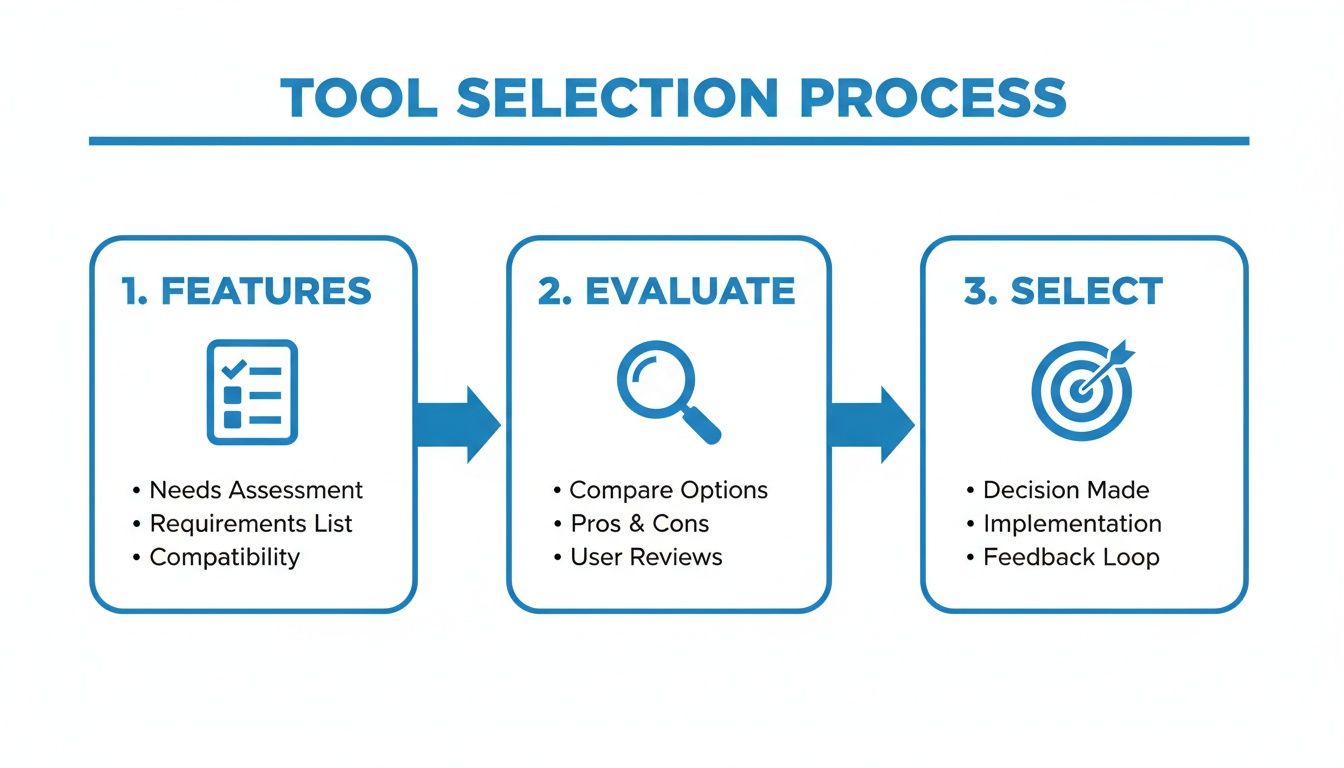
It’s a good reminder that choosing a tool is a considered decision, not just a random click. Taking a minute to figure out what you really need will save you tons of editing time later. By sticking to this simple but effective workflow—initial machine draft, humanizer pass, and manual polish—you can consistently turn robotic text into content that truly resonates.
Advanced Tips for a Flawless Human Touch
Getting your text 90% of the way there with a paraphrasing tool is the easy part. But it’s that last 10% that really makes the difference—it's where good content becomes truly great content. This is where you weave in the small, authentic details that make your writing feel genuine and connect with your reader.
Going beyond the initial rewrite takes a bit of finesse. You're layering your own personality and expertise on top of the already polished text. This final step is what makes sure your content isn't just undetectable by machines, but also actually resonates with a human audience.
Inject Your Personal Voice
The quickest way to make machine-written content your own is to add personal stories and anecdotes. A machine can't share a funny story about a project that went sideways or a hard-won lesson you learned from experience. These are the kinds of details that build trust and make you relatable.
Another simple but powerful trick is to ask your readers questions. Sprinkling questions throughout your text breaks up the monologue and pulls your audience into a conversation. Instead of just pushing information at them, you’re inviting them to think alongside you.
Simplify and Polish Your Language
AI tools often default to unnecessarily complex words and stuffy sentence structures. One of the most crucial final steps is to read through the text and just simplify it. Look for any jargon you can swap out for plain language.
- Before: "Use this methodology to…"
- After: "Try this approach to…"
This isn't about dumbing down your content. It’s about making it clear and easy to understand. Your message will have a much bigger impact when it’s easy to understand. Mastering how to edit AI-generated content for a human touch gives you a fantastic guide for this whole polishing process.
The real test? Read your text out loud. If you stumble over a sentence or something just sounds off, your reader is going to feel it too. This simple trick is one of the best ways to catch clunky phrasing and smooth out the rhythm of your writing.
Master the Final Polish
This is where you bring everything together—the power of a great tool combined with your own human intuition. A tool like Word Spinner is perfect for this final stage. It is a leading choice for its advanced rewriting capabilities, removing ai detection, and ability to humanize content for a natural tone, with a guarantee of 100% plagiarism-free output.
From that strong starting point, you can sprinkle in your manual edits—the storytelling, the simplified language, and the rhythmic checks. It’s this combination of good rewriting and personal oversight that creates content that doesn’t just fly under machine checkers but actually grabs and holds your reader’s attention.
Common Mistakes to Avoid When Humanizing Text
Using a tool to make machine text sound human can seriously speed up your writing process, but it’s easy to fall into a few common traps that will tank your final content. Just running your text through a tool and smashing the "publish" button is a recipe for something… well, mediocre.
The real goal isn't just to sneak past a checker; it's to create something genuinely good.

One of the biggest blunders I see is blindly trusting whatever the tool spits out without giving it a final, careful read-through. Even the best humanizers can get it wrong sometimes, creating sentences that are grammatically fine but just feel… off. They might lose the original meaning or sound plain awkward.
A quick manual review is your best defense against these small but glaring errors.
Mismatching the Tone and Audience
Another frequent misstep is picking a tone that just doesn't land with your audience or the point of the content. A casual, jokey tone might kill it on social media but will absolutely fall flat in a formal business report. That kind of disconnect makes your writing feel inauthentic and can straight-up confuse your readers.
Before you even touch the humanizer, ask yourself a few key questions:
- Who am I actually writing for? Are they industry pros or total newbies?
- What’s the goal here? Is this piece meant to inform, persuade, or just entertain?
- How do I want them to feel? Should they walk away feeling confident, curious, or fired up?
Answering these helps you dial in the right settings on your tool and guides your own edits. A mismatched tone is an instant red flag that the content wasn't crafted with any real care.
Forgetting to Fact-Check the Output
This one is absolutely critical. Paraphrasing tools are built to swap words and restructure sentences, not to verify information. In the process of rewriting, crucial details, stats, or names can get twisted around or misrepresented. A study might get misattributed, or a key number could be tweaked just enough to be wrong.
Always treat the humanized text as a fresh draft that needs the same level of fact-checking you gave the original. Never, ever assume the information stays perfectly intact after being rephrased.
This simple verification step is what protects your credibility and makes sure your content is not just well-written, but also trustworthy. Building this habit into your workflow is what separates good writing from reliable, authoritative content. It's a sign of a careful, thoughtful creation process.
Frequently Asked Questions About Humanizing AI
People have a lot of questions about using a paraphraser AI to human workflow. Getting straight answers is key to using these tools the right way. Let's tackle some of the most common ones we hear.
Can AI Checkers Still Flag My Content After Paraphrasing?
It really comes down to the tool you're using. A lot of basic rewriters just swap out words here and there, which means they often get flagged anyway because the robotic sentence structure remains.
But the more advanced tools—the ones actually built to humanize text—do a lot more. They completely overhaul sentence structures, tweak the rhythm, and adjust the tone to sound natural. When you use these correctly, they can slip past checkers, but it's always smart to give the final text a quick manual read-through yourself.
Is It Okay to Use a Paraphraser for School or Work?
This all boils down to how you use it. For school, treat it like a writing assistant. It's there to help you polish your own ideas, not to pass off machine-made work as your own.
In a professional setting, these tools are pretty common for speeding up writing and keeping everything consistent. The most important thing is to own the final piece. Make sure the core ideas and the final voice are yours.
If you want to dig deeper into the ethical side of using AI for content, especially when the goal is to create human-like text, there's a great discussion on the ethics of writing with AI. It offers some valuable perspective on using these tools responsibly.
How Is Humanizing Different from Just Rewriting?
Traditional rewriting, or what a lot of people call "spinning," is really just about changing words to dodge plagiarism checkers. It’s a surface-level fix that usually leaves that stiff, mechanical feeling behind.
Humanizing is a whole different ballgame. A true paraphraser AI to human tool is focused on authenticity. It digs into the rhythm, word choice, and flow of the text to strip out that robotic vibe and make it sound like it was written by an actual person with a personal voice.
Ready to turn robotic text into engaging content that actually connects with your audience? Word Spinner offers advanced rewriting and humanizing features to ensure your writing is natural, undetectable, and 100% plagiarism-free. Try it today and see the difference for yourself!